
Security Configuration
Installation Instructions
Step 1 – Enable Developer Mode
On a stock Pixel:
- Settings → About Phone → Tap Build Number 8 times
Step 2 – Enable OEM Unlocking
- Settings → System → Developer Options → Enable OEM Unlocking
If OEM Unlocking is greyed out:
- Connect to Wi-Fi
- Reboot the phone
- Wait 5–10 minutes
Step 3 – Power Off Device
- Power the device off completely
Step 4 – Enter Fastboot Mode
- Hold Volume Down → Press the Power Button while holding Volume Down
Step 5 – Open GrapheneOS Web Installer
https://grapheneos.org/install/web
Step 6 – Unlock Bootloader
- Connect phone to PC via USB → Click Unlock Bootloader
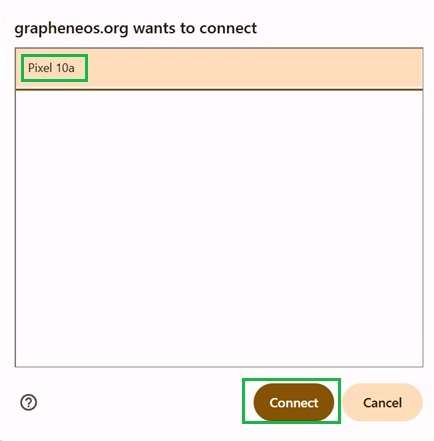
- Select your Pixel when prompted → Click Connect
Step 7 – Install GrapheneOS
- Click Download Release and wait for completion
- Click Flash Release and wait for completion
Step 8 – Lock Bootloader
- Click Lock Bootloader on the Web Portal.
- Press Volume Down to select Lock Bootloader → Press Power Button to confirm
Step 1 – Complete Initial Setup
Power device on and proceed through the GrapheneOS setup.
(If you already have GrapheneOS, factory reset device and start from scratch)
Important:
- Connect to a Wifi
- Skip setting a PIN for now. Do NOT set a password
- Security Preview Releases - Leave Enabled
- On the last set up page, if there is option for Disable OEM Unlocking - Leave default setting. We want it ticked so that it does disable OEM unlocking
Step 2 – Re-enable Developer Mode
- Settings → About Phone → Tap Build Number 8 times
- Settings → System → Developer Options → Enable USB Debugging
Step 3 – Configure Duress PIN
Settings → Security & Privacy → Device Unlock → Duress Password
Set the Duress PIN for all 4 boxes to:
5555
Step 4 – Configure Auto Reboot
Settings → Security & Privacy → Exploit Protection → Auto Reboot
Set to:
4 Hours
Step 5 – Enable eSIM Support
Settings → Network & Internet → Enable eSIM Support
Device will Reboot
Step 6 – Set Up eSIM
If purchased with an eSIM, follow instructions to addSettings → Network & Internet → SIMs → Set up an eSIM → Allow Camera permission → Scan QR code provided → Follow Prompts → Toggle eSim On when prompted
Step 7 – Configure Network Type
Settings → Network & Internet → SIMs → Click on your SIMs Name to access menu
- Scroll down and set Preferred Network Type to 5G & LTE (or 5G & 4G) Only
Step 1 – Validate License
www.pfsecured.com
- Enter your License Key and Validate.
Step 2 – Connect Device
- Connect phone to PC via USB → Click Connect Phone Via USB
- Select your Pixel when prompted → Click Connect
- Unlock the phone screen → Press Allow on the phones ADB prompt
Step 3 – Select Applications
Choose the APKs you want installed.
Recommended:
- Leave everything selected
Step 4 – Run Installation
- Press Run Security Install → Wait 5-15 Minutes for this to complete
Requirements:
- Use a high quality USB cable
- Leave the phone on the table untouched
- Do not move or disconnect USB
If Installation Fails
DEFAULT PASSWORD:
FOR BOTH OWNER AND PRIVATE (User 10) PROFILE IS NOW SET TO 0000
DO NOT TYPE 5555 AS THAT WILL WIPE THE DEVICE.
Please read above - your passwords are defaulted to 0000.
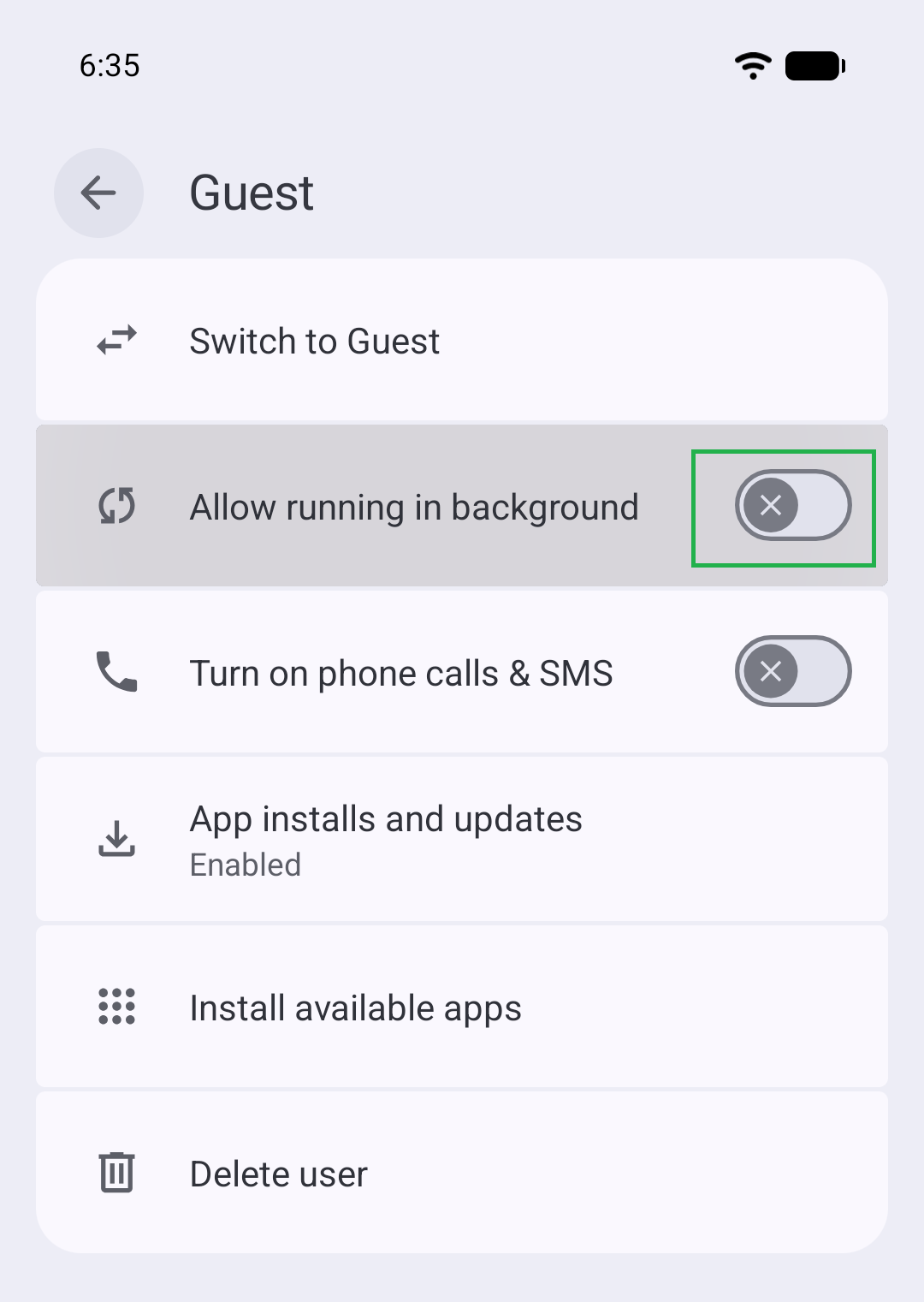
Step 1 – Disable Running in Background for "Private" Profile
Settings → System → Users → Private
- Disable/Untick Running In Background
Step 2 – Restrict USB to Charging Only
Settings → Security & Privacy → Exploit Protection → USB-C Port
- Set this to Charging Only (Enter passcode when prompted)
Step 3 – Set Owner Profile Password
Settings → Security & Privacy → Device Unlock → Screen Lock → Password
- Use a strong password. We recommend 20+ characters.
Examples:
- Monday nights are for $leeping 00
- Hungry jacks is better than kfc@123
- TheSoundOfTheOpera1990!
Note:
- Private Profile will be where all your applications are installed.
Step 1 – Switch To Private Profile
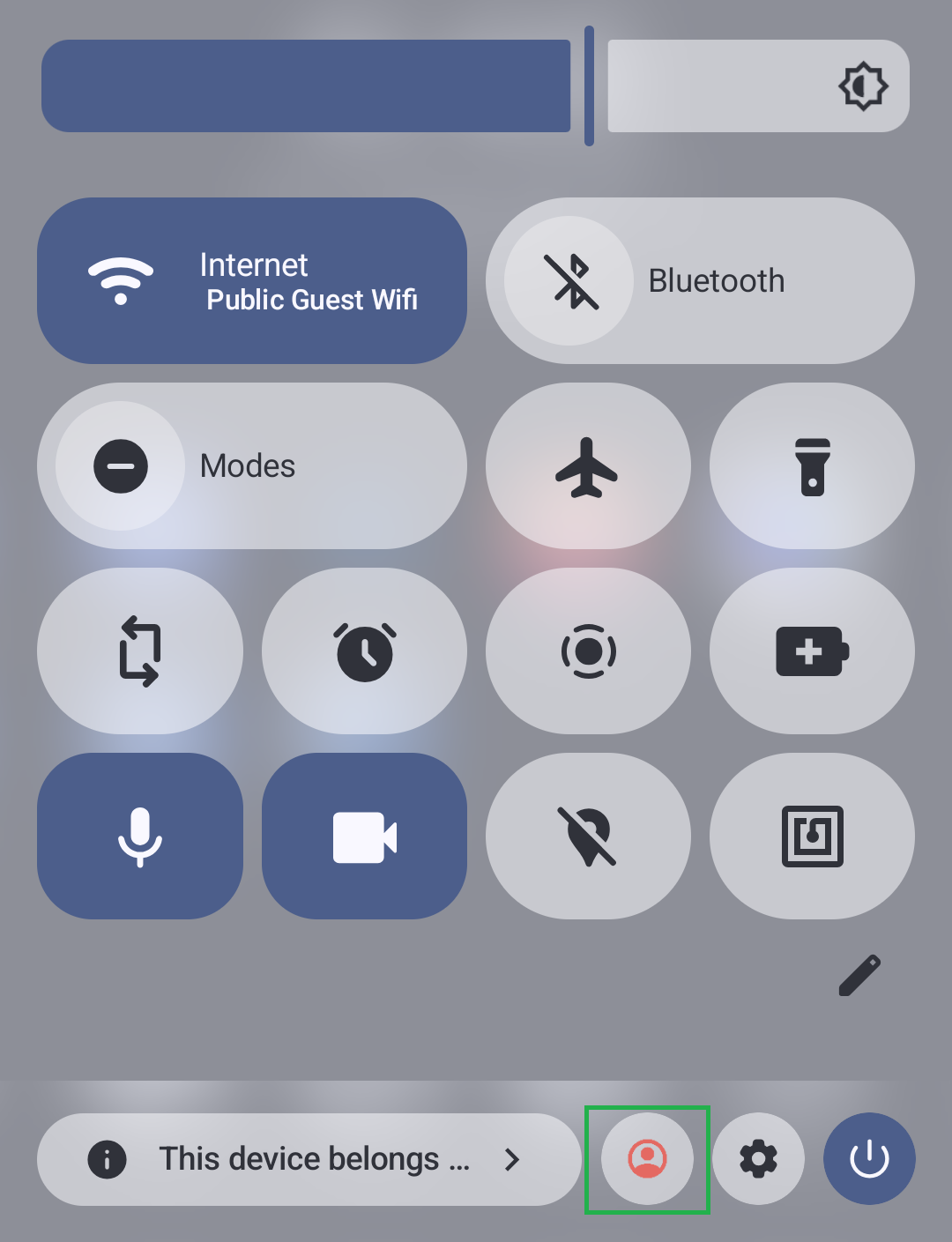
- Swipe down twice from the top of the screen → Press red user icon
- Select Private → Log in using 0000
Step 2 – Configure Launcher
Note: This step will set up wallpaper and icons. If you did not select all apps to be installed, feel free to skip this step and just uninstall the app called "Setup".
- Open the app called "Setup" and click Install Files. This will then take you to the app page. Click Uninstall.
- Tap and hold on an empty space on the Home screen and select Home Settings.
- Click the 3 dots in the top right, click Restore Backup, and select HomescreenIcons.lawnchairbackup.
- Repeat the above steps. Restoring the backup twice will get the icons to show up.
For resellers, you can open App Updater/Obtainium → Import/Export → Obtainium Import → zzupdater.json. Once done, you can open App Updater before deploying the device and update all the apps.
Step 3 – Configure Mullvad VPN
- Open Mullvad VPN and log in using the account provided
- Click on Connect and allow
Step 4 – Set Private Profile Password
Settings → Security & Privacy → Device Unlock → Screen Lock → Password
- Use a strong password. If you are forgetful, you can use the same password you set for Owner Profile.
Step 5 – Set Fingerprint Authentication
Settings → Security & Privacy → Device Unlock → Fingerprint → Add Fingerprint
- Once fingerprint is set up, scroll down to the new option labelled Enable Second Factor PIN → Set an 8 digit PIN for fingerprint authentication
Step 6 – Return To Owner Profile
- Hold the Power Button → Select End Session to go back to Owner Profile
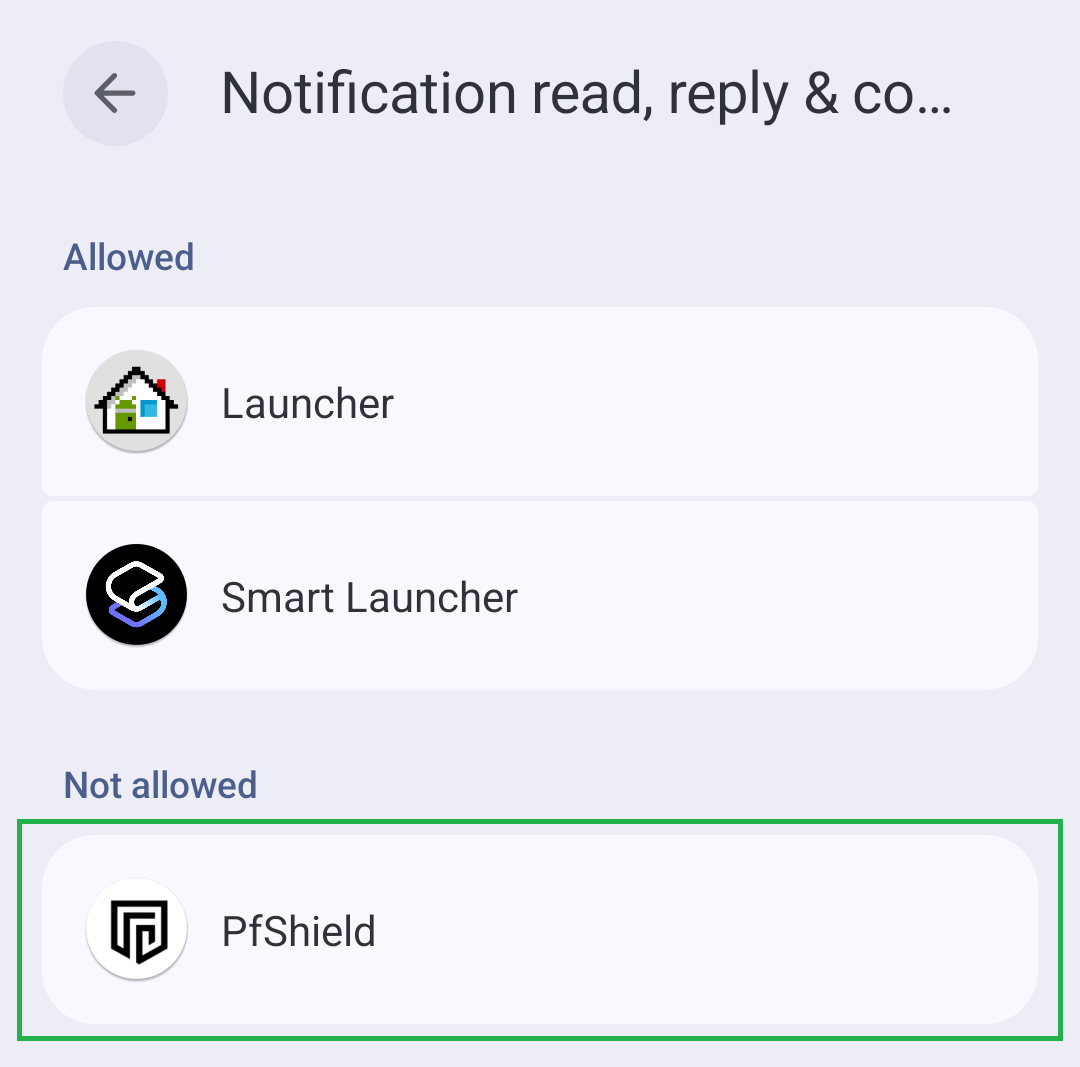
Open Security App
- Scroll up on wallpaper and open the app called System.
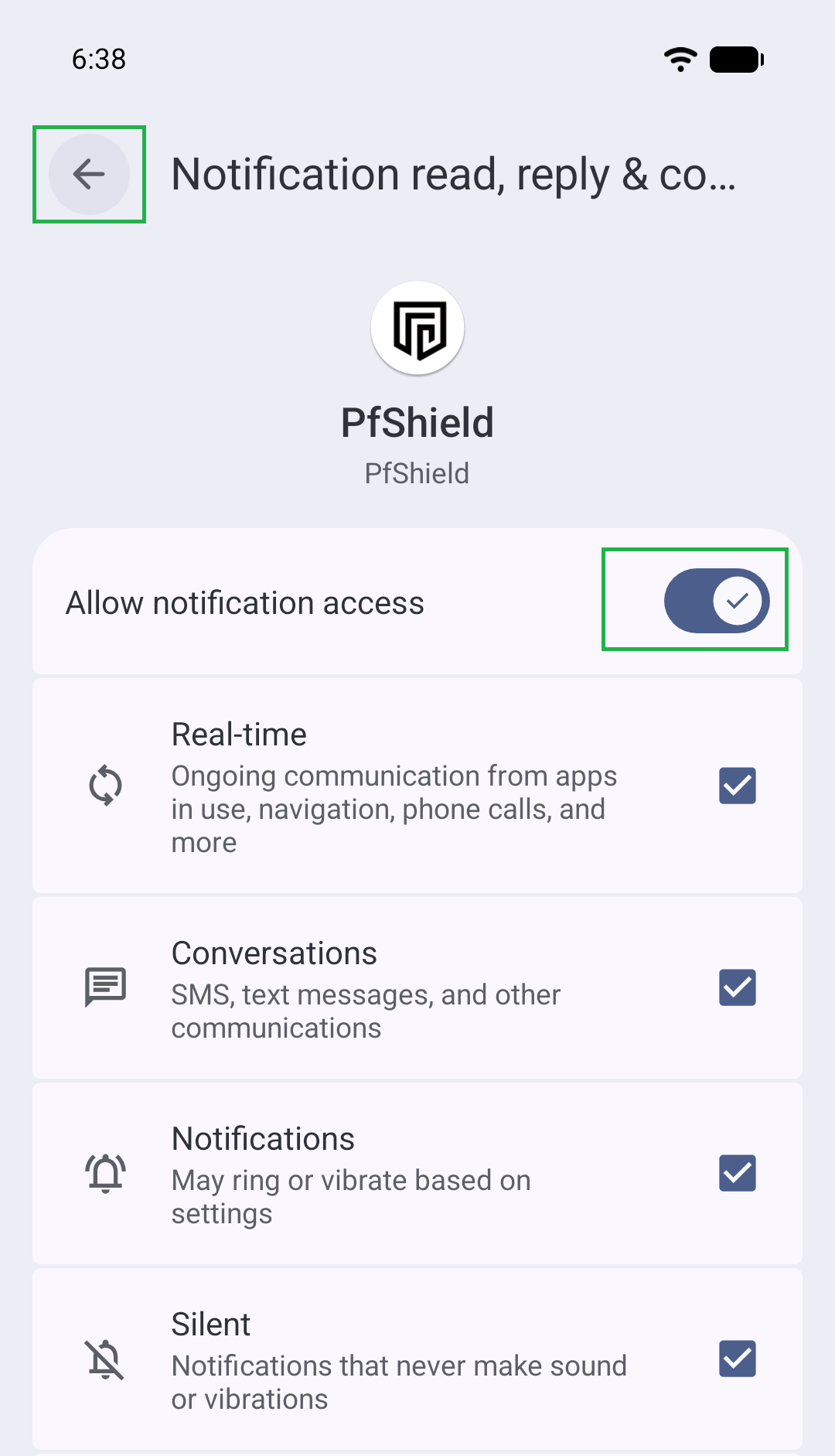
- When the menu pops up, select PfShield and toggle Notification Permissions on.
- Click the top left arrow twice to go back.
- Allow when it prompts for Admin Permission.
Recommended Default Setup
We highly recommend leaving all PfShield settings at their default values.
For default setup, press Start Protection Service and move on to "Usage Guide".
As soon as you press the button, the device will enter Lock Down Mode. You will no longer have access to the regular launcher or home screen.
PfShield Security Suite
CLICK BELOW TO VIEW CONFIGURATION OPTIONS
Lock Timer
Default:
14 Days
This wipes the device if the Owner Profile has not been unlocked within the selected timeframe.
- Do not set this below 3 days
- Private/Other Profile unlocks do not reset this timer.
- Only Owner Profile unlocks reset this timer. Since our auto reboot is set to 4 hours, upon waking up in the morning, phone will automatically have rebooted back into Owner Profile. Unlocking the device will then reset this timer.
Network Timer
Default:
16 Hours
This wipes the device if it has no internet connection for the selected timeframe.
- Wi-Fi or mobile data connection will reset the timer
- Logging in to Owner Profile will reset the timer
- Turning the phone off pauses the timer
- The timer only counts while the phone is powered on. This means if you have cellular issues, or are about to fly on a plane or travel in remote areas, simply turn the device off to pause the timer. Upon turning on and logging in, this timer will reset.
Failed Passcode Attempts
Default:
10 Attempts
Wipes the device after the number of failed passcode attempts (Owner Profile only).
Notification Message Wipe
Default wipe phrase:
!forget
The incoming SimpleX or SMS notification must match exactly.
Test phrase:
testcode
Power Button Quick Wipe
Default:
Enabled
This enables the emergency wipe shortcut described in the Usage Guide. Rapidly pressing the power button will wipe the device.
Fake Airplane Mode Toggle
Default:
Disabled.
Deprecated function. When enabled in Owner Profile, it creates a fake shortcut tile the user can place into the taskbar to wipe the device. It is no longer in use because Lockdown OS is more secure.
USB Wipe
Default:
Disabled.
This will wipe if the device is connected to a data connection such as a PC or CarPlay. As USB has been completely disabled, this function can be left off. This is much safer than purposely allowing USB to connect to Data/Tools.
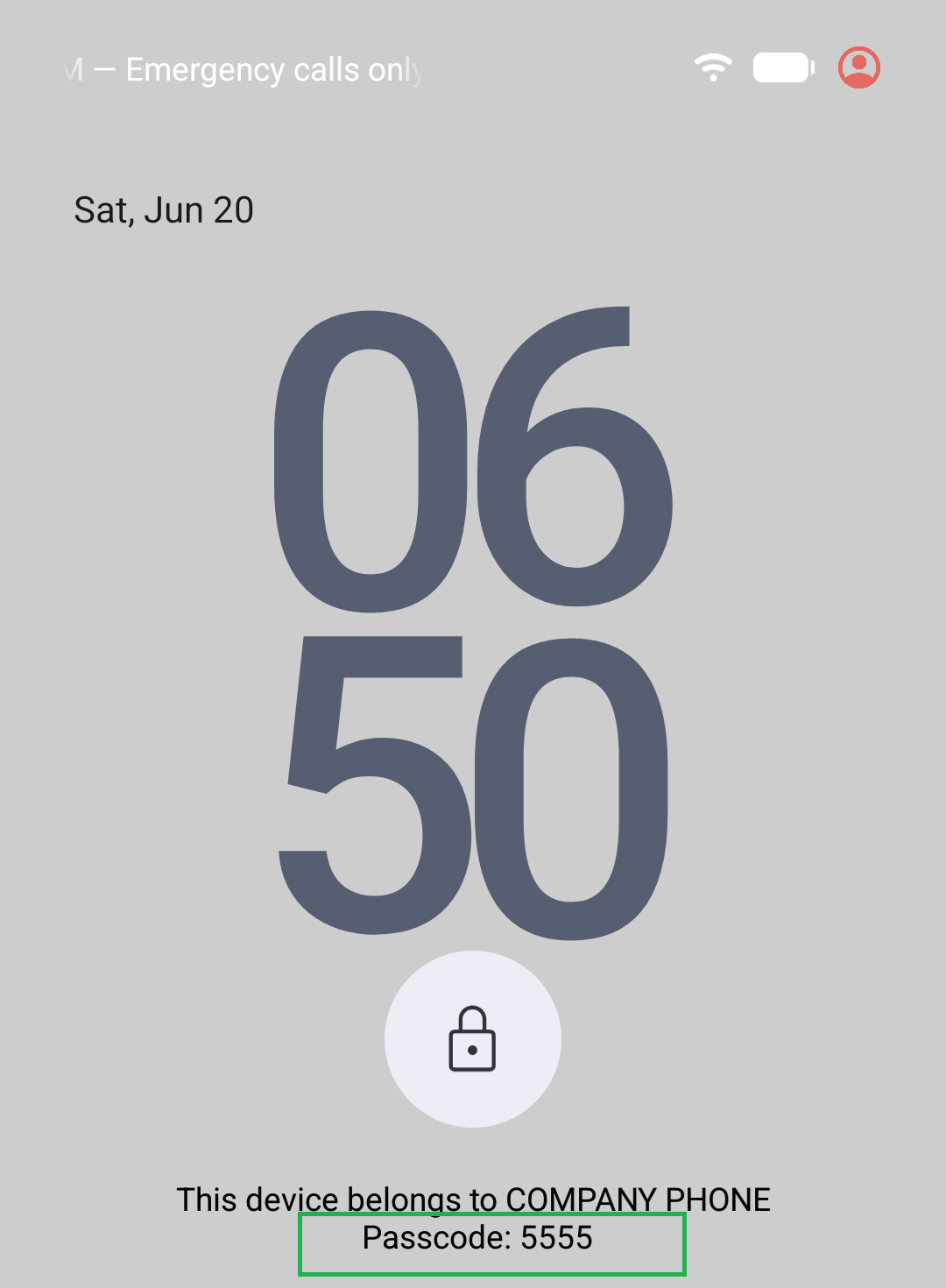
Lock Screen Decoy
This controls the passcode message displayed at the bottom of the lock screen.
Lock Screen Passcode Text controls the numbers shown.
Lock Screen Company Text controls the company name.
This device belongs to The Owner. PASSCODE: 5555
If you change the Duress PIN, you should update the passcode text in PfShield so both values match.
We HIGHLY recommend that you leave the permanent toggles on as these are the most important.
For the other restrictions, disable things like Camera, Microphone, GPS, NFC, and Location if you do not plan to use them.
Anti Snatch Motion Protection
Default Sensitivity:
20
Locks the screen after sudden movement such as dropping, snatching, or throwing the device.
- This has an 8 second cooldown
Accessing Admin Menu / Switching Users
Once you have enabled the Protection Service in the previous step, Owner Profile will be completely locked out with a fake home launcher.
- Accessing Admin Menu -
Admin Menu Options
Auto Reboot Timer
The device will automatically reboot into the Owner Profile overnight or after 4 hours. Make sure you enter the correct password for the right profile.
Locked Device Timer
This timer will wipe the phone if it is not unlocked for the specified amount of time - default is 14 Days.
Network Loss Timer
This timer will wipe the device after the configured period without internet connection - default is 16 Hours.
VPN Code
Do not share or reuse the VPN code elsewhere. If you need a new VPN code, contact support.
Notes Storage
For notes, use Standard Notes.
You may set up cloud sync using a false email and password to allow recovery if the device is wiped.
Step 1 – Set Up SimpleX On Pixel
- Open SimpleX on the Owner Profile (You can do this by accessing Admin Menu → Android System Settings → Apps → All Apps → SimpleX → top right corner icon to launch the app)
- Press Get Started
- Enter a profile name
- Create profile
- Set notifications to Instant
Step 2 – Create Public Address
- Select Let Someone Connect To You
- Select Create Public Address
- Save the URL or QR code
Step 3 – Connect From Another Device
- Install SimpleX on another device
- Add the Pixel using the saved URL or QR code
- Send a message
- Accept the chat request on the Pixel
Step 4 – Test Remote Wipe
Send this test phrase:
testcode
If a notification appears saying test successful, remote wipe is ready.
Step 5 – Wipe Device Remotely
Send the configured wipe phrase exactly as saved in PfShield.
Default wipe phrase:
!forget
Remote Wipe Limitations
- The wipe phrase must match exactly
- No extra spaces, words, or line breaks
- The device must receive the notification for wipe to trigger
- If the phone has no internet, it will not wipe immediately
Owner Profile Behaviour
- If the phone is unlocked in Owner Profile, it will wipe
- If the phone is locked in Owner Profile, it should wipe once the notification is received
Private Profile Behaviour
- If the phone is in Private Profile, it will not wipe immediately
- If the user ends the session back to Owner Profile, it may wipe once the notification arrives
- If the phone reboots before the notification is received, the original notification may be lost
Recommended Remote Wipe Method
Send the wipe message immediately, then send the same wipe message again after 4 hours. This gives the device the best chance of receiving the wipe notification.
How to Wipe device in Emergency
Click the power button as fast as you can. Clicking this 7-8 times within 2 seconds will cause the device to wipe.
In an emergency, spam the power button non-stop until wipe begins.
(There is a 4 second visual delay while the device wipes all other user profiles in the background before initiating a factory reset. This is to ensure wipe cannot be paused or cancelled. For your peace of mind, just keep pressing power button as fast as you possibly can until device turns off)
Default Duress PIN:
5555
Typing this password on any lockscreen followed by Pressing Enter will cause the device to wipe immediately.
None in box - Forward this to user
𝗗𝗢 𝗧𝗛𝗜𝗦 𝗢𝗡 𝗗𝗔𝗬 𝗬𝗢𝗨 𝗥𝗘𝗖𝗘𝗜𝗩𝗘 𝗗𝗘𝗩𝗜𝗖𝗘.
-----------------------------
𝐓𝐡𝐞 𝐩𝐡𝐨𝐧𝐞 𝐡𝐚𝐬 𝟑 𝐩𝐚𝐬𝐬𝐰𝐨𝐫𝐝𝐬 - 𝐀𝐥𝐥 𝐚𝐫𝐞 𝐬𝐞𝐭 𝐭𝐨 𝟎𝟎𝟎𝟎
Owner Profile
Admin Menu (Through Fake Phone App)
Private Profile
(Do 𝐍𝐎𝐓 type the number written at bottom of lock screen, that is the 𝐟𝐚𝐤𝐞 𝐰𝐢𝐩𝐞 𝐩𝐢𝐧)
------------
1) 𝐂𝐡𝐚𝐧𝐠𝐞 𝐀𝐝𝐦𝐢𝐧 𝐌𝐞𝐧𝐮 𝐩𝐚𝐬𝐬𝐰𝐨𝐫𝐝
Unlock Owner with 0000.
Click 𝐏𝐡𝐨𝐧𝐞 app
Dial 0000 on phone. 𝐇𝐨𝐥𝐝 𝐭𝐡𝐞 # 𝐛𝐮𝐭𝐭𝐨𝐧 to access 𝐀𝐝𝐦𝐢𝐧 𝐌𝐞𝐧𝐮
- Click 𝐂𝐡𝐚𝐧𝐠𝐞 𝐀𝐝𝐦𝐢𝐧 𝐏𝐢𝐧
Set 4-8 digit pin. This pin is only used to unlock fake phone app. This is NOT the lock screen passwords (8 Incorrect admin pins will vibrate and delete hidden profiles)
2) 𝐂𝐡𝐚𝐧𝐠𝐞 𝐎𝐖𝐍𝐄𝐑 𝐏𝐚𝐬𝐬𝐰𝐨𝐫𝐝
In 𝐀𝐝𝐦𝐢𝐧 𝐌𝐞𝐧𝐮, press 𝐀𝐧𝐝𝐫𝐨𝐢𝐝 𝐒𝐲𝐬𝐭𝐞𝐦 𝐒𝐞𝐭𝐭𝐢𝐧𝐠𝐬.
Go to "Security and Privacy -> Device Unlock -> Screen Lock -> 𝐏𝐚𝐬𝐬𝐰𝐨𝐫𝐝"
𝐔𝐬𝐞 𝐚 𝐬𝐭𝐫𝐨𝐧𝐠 𝐩𝐚𝐬𝐬𝐰𝐨𝐫𝐝 (20+ characters)
Length > Randomness.
Examples:
"Yellow paper card board 54321!"
"MacdonaldsForBreakfast1980?"
3) 𝐄𝐧𝐚𝐛𝐥𝐞 𝐃𝐚𝐭𝐚
In System Settings, go to "Network & Internet -> Sims" Toggle the preloaded sim ON.
𝐂𝐥𝐢𝐜𝐤 𝐎𝐧 𝐭𝐡𝐞 𝐒𝐢𝐦𝐬 𝐍𝐚𝐦𝐞 -> (ie PLUS/SCT/NPN)
- Set Preferred network type 𝟓𝐆 & 𝐋𝐓𝐄(4G) 𝐎𝐧𝐥𝐲
4) 𝐋𝐨𝐠𝐢𝐧 𝐭𝐨 𝐏𝐫𝐢𝐯𝐚𝐭𝐞 𝐏𝐫𝐨𝐟𝐢𝐥𝐞
Enter the 𝐀𝐝𝐦𝐢𝐧 𝐌𝐞𝐧𝐮 again (secret phone pin). Click 𝐒𝐰𝐢𝐭𝐜𝐡 𝐏𝐫𝐨𝐟𝐢𝐥𝐞. Select User 10
5) 𝐂𝐡𝐚𝐧𝐠𝐞 𝐏𝐫𝐢𝐯𝐚𝐭𝐞 𝐏𝐫𝐨𝐟𝐢𝐥𝐞 𝐏𝐚𝐬𝐬𝐰𝐨𝐫𝐝
Unlock this user with 0000. Simply swipe up middle of screen to access apps. Go to
"Settings -> Security and Privacy -> Device Unlock -> Screen Lock -> 𝐏𝐚𝐬𝐬𝐰𝐨𝐫𝐝"
You can use same password as 𝐎𝐰𝐧𝐞𝐫. Otherwise, set an equally strong password.
6) 𝐒𝐞𝐜𝐮𝐫𝐞 𝐅𝐢𝐧𝐠𝐞𝐫𝐩𝐫𝐢𝐧𝐭 𝐨𝐧 𝐏𝐫𝐢𝐯𝐚𝐭𝐞 𝐩𝐫𝐨𝐟𝐢𝐥𝐞
"Settings -> Security -> Device Unlock -> Fingerprint -> Set Up Fingerprint"
Once set up, go to bottom of the Fingerprint Menu. Select 𝐒𝐞𝐜𝐨𝐧𝐝 𝐅𝐚𝐜𝐭𝐨𝐫 𝐏𝐢𝐧 and set up.
This will force fingerprint unlocks to require pin.
𝐓𝐡𝐫𝐞𝐞𝐦𝐚 𝐋𝐢𝐜𝐞𝐧𝐬𝐞 𝐊𝐞𝐲
Attached under box lid
----------------------
𝗛𝗢𝗪 𝗧𝗢 𝗪𝗜𝗣𝗘 𝗗𝗘𝗩𝗜𝗖𝗘 𝗜𝗡 𝗘𝗠𝗘𝗥𝗚𝗘𝗡𝗖𝗬
𝐏𝐨𝐰𝐞𝐫 𝐛𝐮𝐭𝐭𝐨𝐧 𝐰𝐢𝐩𝐞
Tap power button 8 times as fast as you can.
(Within 2 seconds). In emergency, just spam the power button non stop until wipe triggers
𝐅𝐚𝐤𝐞 𝐏𝐢𝐧 𝐖𝐢𝐩𝐞
Type the fake pin shown on the bottom of lock screen. You 𝐡𝐚𝐯𝐞 𝐭𝐨 𝐏𝐫𝐞𝐬𝐬 𝐄𝐧𝐭𝐞𝐫 as well.
This is usually set to 5555
𝐒𝐞𝐭𝐭𝐢𝐧𝐠 𝐔𝐩 𝐑𝐞𝐦𝐨𝐭𝐞 𝐖𝐢𝐩𝐞
Contact for instructions
---------------------
𝗧𝗛𝗜𝗡𝗚𝗦 𝗧𝗢 𝗥𝗘𝗠𝗘𝗠𝗕𝗘𝗥
𝟒 𝐇𝐨𝐮𝐫𝐬 𝐈𝐧𝐚𝐜𝐭𝐢𝐯𝐢𝐭𝐲 -> 𝐏𝐡𝐨𝐧𝐞 𝐑𝐞𝐛𝐨𝐨𝐭𝐬
Make sure you enter the password for the correct profile. 𝐃𝐎 𝐍𝐎𝐓 change this timer
𝐏𝐡𝐨𝐧𝐞 𝐖𝐢𝐥𝐥 𝐖𝐢𝐩𝐞 𝐈𝐟 𝐍𝐨𝐭 𝐋𝐨𝐠𝐠𝐞𝐝 𝐈𝐧 𝐅𝐨𝐫 (𝟏𝟒) 𝐃𝐚𝐲𝐬
Unlock owned to reset this. This cannot be paused
𝐏𝐡𝐨𝐧𝐞 𝐰𝐢𝐥𝐥 𝐰𝐢𝐩𝐞 𝐢𝐟 𝐧𝐨 𝐢𝐧𝐭𝐞𝐫𝐧𝐞𝐭 𝐟𝐨𝐫 (𝟏𝟔) 𝐡𝐨𝐮𝐫𝐬 𝐜𝐨𝐧𝐬𝐞𝐜𝐮𝐭𝐢𝐯𝐞𝐥𝐲
To pause, simply turn phone off.
(Do if you have no internet, flying overseas, etc). Timer only resets upon unlocking phone in 𝐎𝐖𝐍𝐄𝐑 Profile
𝐃𝐎 𝐍𝐎𝐓 𝐑𝐄𝐔𝐒𝐄 𝐎𝐑 𝐒𝐇𝐀𝐑𝐄 𝐕𝐏𝐍 𝐀𝐂𝐂𝐎𝐔𝐍𝐓.
Do not enable DAITA
𝐃𝐞𝐥𝐞𝐭𝐞𝐝 𝐝𝐚𝐭𝐚 𝐮𝐧𝐫𝐞𝐜𝐨𝐯𝐞𝐫𝐚𝐛𝐥𝐞.
Ensure you have secured backups of anything important.
𝐍𝐨𝐭𝐞 𝐒𝐭𝐨𝐫𝐚𝐠𝐞
Use included StandardNotes app. Set up account using fake email (no verification required) to store notes online.
First profile is a fake launcher. 𝐔𝐒𝐁 𝐄𝐧𝐚𝐛𝐥𝐞 toggle in settings will quietly wipe other profiles. 𝐃𝐨 𝐧𝐨𝐭 𝐩𝐫𝐞𝐬𝐬.